
Last updated:
Available plans
Fees can change — always check Settings › Plan in your account. In November 2026 the plans are:
| Plan | Monthly | EEA cards in person | EEA cards online |
|---|---|---|---|
| Starter | €12.99 | 1.95% + €0.25 | 2.15% + €0.45 |
| Growth | €39.99 (first month free) | 1.90% + €0.22 | 2.10% + €0.43 |
| Business | €99.99 | 1.85% + €0.20 | 2.05% + €0.40 |
Starter is for getting started at a low monthly cost, Growth for merchants who sell regularly, and Business for higher volume with the lowest per-transaction fees. Open Compare plans to see every feature side by side.
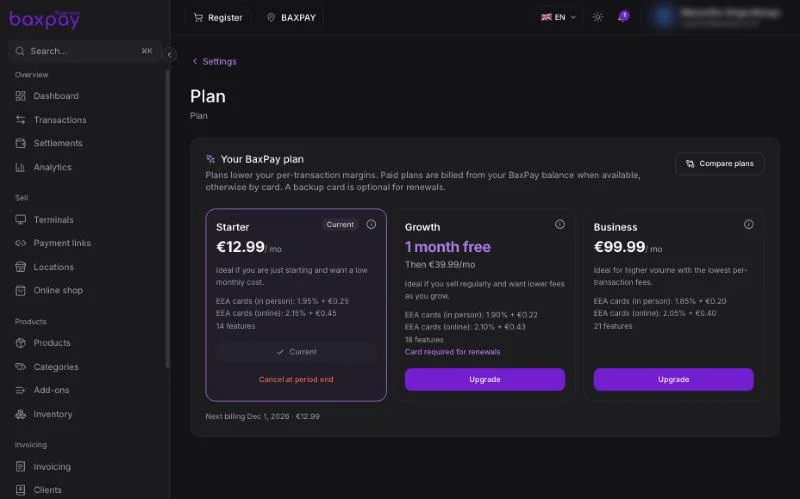
How to choose a plan
During onboarding
Complete the last wizard step Choose plan, select a plan, and confirm.
Later
- Open Settings › Plan.
- Compare features and fees with Compare plans.
- Select Upgrade on a plan and confirm.
Plans are billed from your BaxPay balance when it can cover the fee, otherwise by card. A backup card is optional on Starter; the Growth free month needs a card for renewals.
To change your mind, Cancel at period end keeps your current plan until the next billing date shown under the plans.
Online shop
The Online shop is part of your plan; a custom shop domain depends on the plan you choose. Turn the shop on under Settings › Online shop, then publish it from the Online shop page. Companies and freelancers use the same Online shop.
See Online shop.
What happens if payment fails
If a plan cannot be charged, fix billing under Settings › Plan — add or update the card, or top up your balance — then confirm again.
Seeing fees on a sale
On payment links and Register checkouts you can open a fee breakdown (provider cost + BaxPay margin + net).
Tips
- Start on Starter and use Test mode for payment links and invoices while you learn.
- Move to Growth or Business when your volume makes the lower card fees worth the monthly price.
- Plan choice is independent of Locations and Products — you still need verification to take live card payments.
Next: Dashboard & navigation →