
Last updated:
Example shape: pay.baxpay.com/plk_…
Prerequisites
- Plan chosen
- Payment setup ready
- Capability Payment links enabled for your account
Create a one-time link
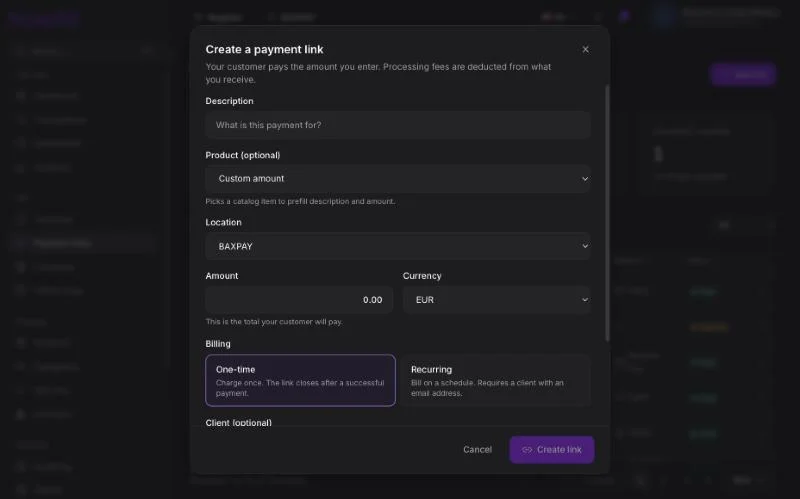
- Open Payment links → Create.
- Enter description and amount, or pick products (quantities).
- Optional: client, reference, expiry, fee payer (you vs customer), location.
- Create → copy URL or show QR.
- Share by SMS, WhatsApp, email, or print.
Recurring links
For subscriptions / retainers:
- Choose mode Recurring.
- Select a client with email.
- Choose interval (weekly / monthly / yearly).
- Customer pays the first installment on the hosted page; later cycles follow the subscription rules.
Register payment links
From Register / Sell, “Payment link” creates a link tied to the cart (and location). Ideal when the customer pays by phone at the counter.
Stock is reserved while the link is open / being paid (short TTL; refreshed when they open card checkout).
Customer experience
- Opens the link.
- Sees your branding (logo / colours from Settings).
- Pays by card (or Pay with BaxPay when offered).
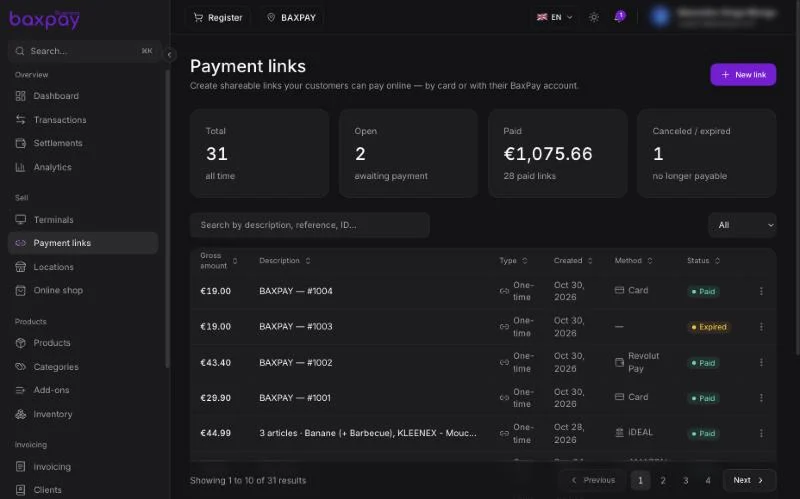
- You get a paid notification; the link shows as Paid.
Manage links
| Action | Effect |
|---|---|
| Cancel | Link can no longer be paid; stock hold released |
| Resend | Email again to the client |
| Filter by location | Header location filter |
Tips
- Prefer product lines when you track inventory.
- Use Test mode with test cards before Live.
- Keep descriptions clear — they appear on the pay page and in Transactions.
Next: Invoicing →