
Last updated:
Transactions
Transactions is the ledger of every payment: card, Tap to Pay, cash, payment link, invoice pay, etc.
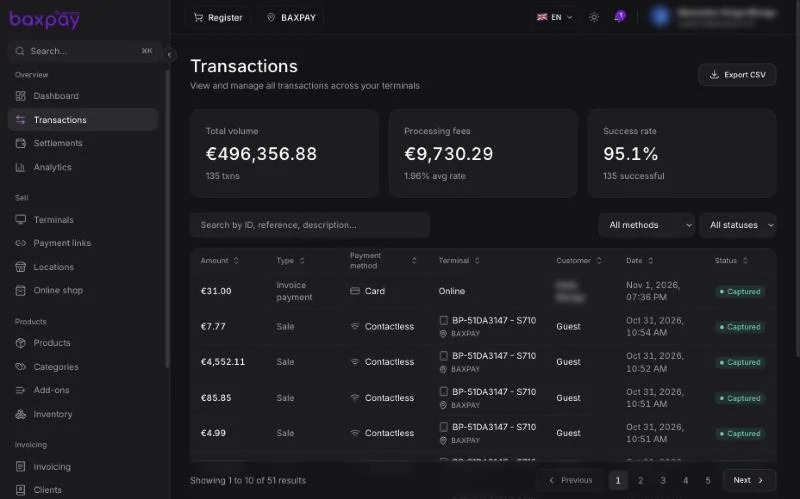
What you can do
- Filter by status, method, date, location.
- Open a payment — see fees, products sold, operator (cashier), terminal.
- Refund (full or partial) when allowed — may restock inventory.
- Print receipt / sale invoice documents when offered.
Location filter
Header location = only sales for that shop. Useful for multi-store managers.
Settlements
Settlements groups captured sales into payout batches toward your bank.
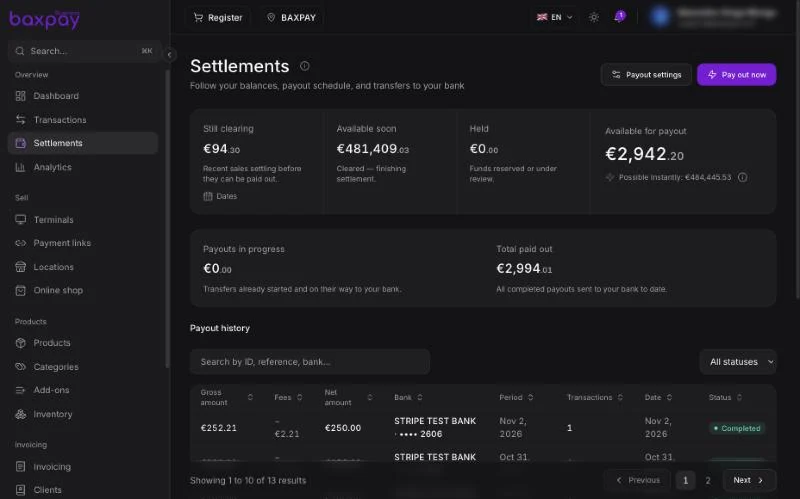
Typical actions
- Open a batch → see included transactions
- Export CSV for your accountant
- View payout schedule / balance (when enabled)
- Request standard or instant payout if your trust level allows
Instant payout availability depends on commercial trust and platform rules — not every merchant sees it on day one.
Cash sales
Cash Register sales appear in Transactions as cash (no card processor). They still decrement stock when products were on the cart.